If you own a small business and your website runs on WordPress, you’ve probably noticed a few things over the past couple of years. Pages load a little slower than they used to. A plugin update took the site down for an afternoon. Your hosting bill went up. Your developer keeps recommending “just one more” caching or security add-on, and the site still doesn’t feel fast.
You’re not imagining it. WordPress is still the largest platform on the web, but the ground under it is shifting. The way modern websites are built has changed in a real way, and small businesses are quietly moving to something better. Here’s what’s happening, why it matters for your business, and what we recommend if you’re thinking about a redesign.
WordPress isn’t broken. It’s just old.
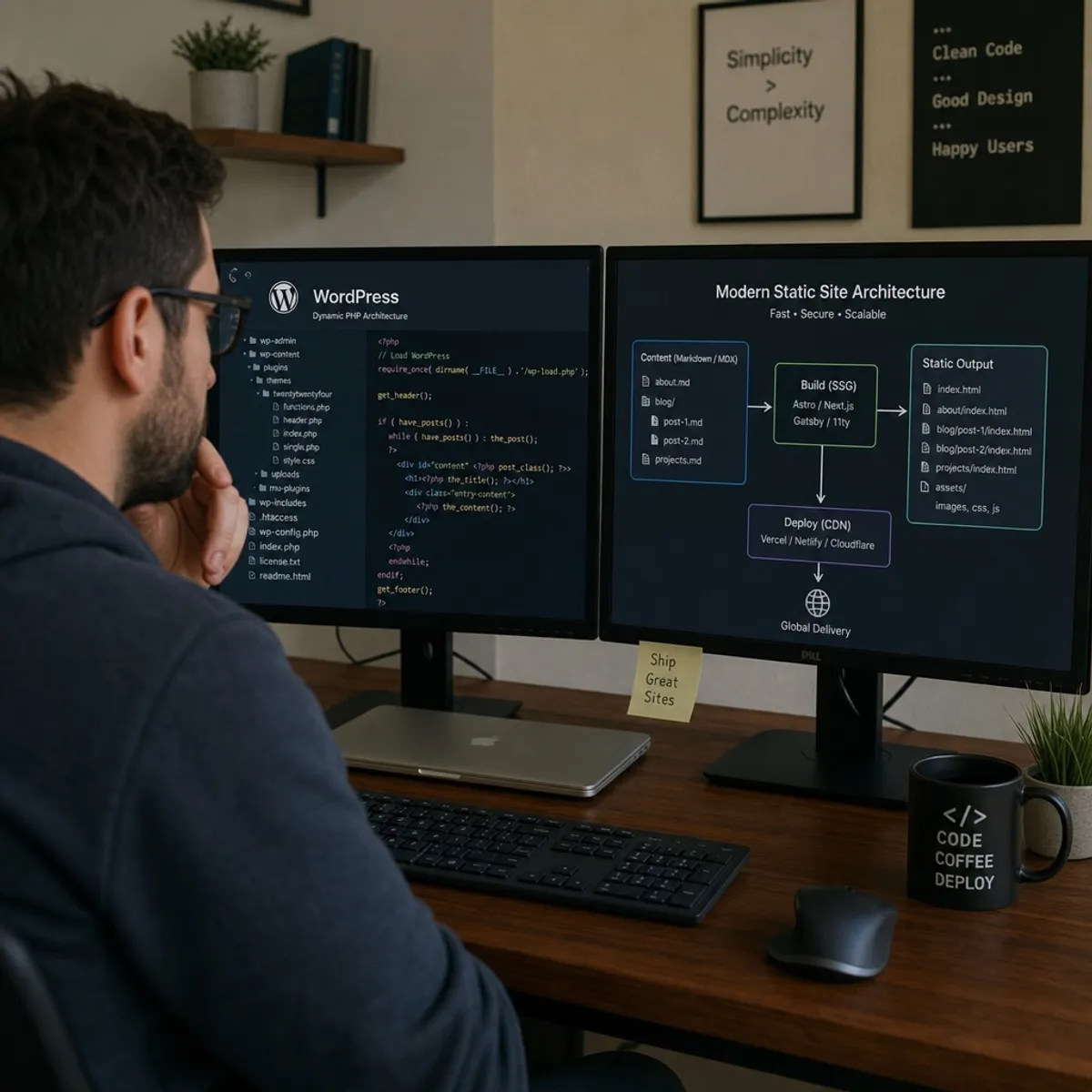
WordPress was built in 2003. It was a genuinely great idea at the time: instead of writing raw HTML files, you’d store all your content in a database, and every time someone visited your site, the server would grab the content, mash it together with your theme, and send back a finished page.
That worked well when the internet was smaller and expectations were lower. In 2026, it comes with a few problems that show up in ways every small business owner can feel:
- It’s slow by design. Every page view requires the server to query a database and build the page from scratch. On a busy day, that’s the whole reason your site slows down or goes offline.
- It leans on plugins for everything. A modern WordPress site typically has 20 to 30 active plugins just to handle basics like forms, SEO, backups, and security. Each one is code written by a different person, and they all have to work together without conflicting.
- Updates are fragile. A WordPress core update, a theme update, or a plugin update can quietly break something, and you often don’t find out until a customer emails you.
None of this is anyone’s fault. It’s just what happens when a 20-year-old design gets asked to do things it was never really built for.
The security problem you might not know you have

Because WordPress connects your public website to a live database and an admin login page, it’s a natural target. Automated bots crawl the web all day looking for WordPress sites they can brute-force into, and they specifically target sites with outdated plugins.
If you have a security plugin installed, that’s already an admission of the problem. The plugin exists because the platform, by itself, isn’t secure. It has to be actively defended.
The trend we’ve seen with our own clients is simple: sites that don’t have a live database and don’t have a public login portal don’t get hacked in the same way. Not because they’re “more secure” in the abstract, but because there’s nothing there to attack.
What’s replacing it, in plain English
The term you’ll hear if you talk to a modern web developer is “static site.” Don’t let the word “static” throw you off. Modern static sites are not the plain HTML pages from the 1990s. They’re highly capable, professional websites that just happen to be built in a smarter way.
Here’s the difference in one sentence: instead of building each page from scratch every time someone visits, the site pre-builds every page once, and then just hands out the finished file.
That single change fixes almost every problem above:
- The site is fast. There’s nothing to build on the fly, so the page loads almost instantly, no matter where the visitor is.
- It’s cheap and stable to host. You’re serving simple files, not running a database, so hosting costs drop and traffic spikes stop crashing the site.
- There’s nothing to hack. No database, no admin login on the public site, no plugins running in production.
- Nothing breaks quietly. Updates happen at build time, in a controlled environment, before the change ever reaches your live site.
If you want the technical name for this approach, it’s usually called “Jamstack” or “the modern web stack.” But you don’t need to remember that. You just need to know that this is what serious agencies are building on right now.
What this looks like on Google
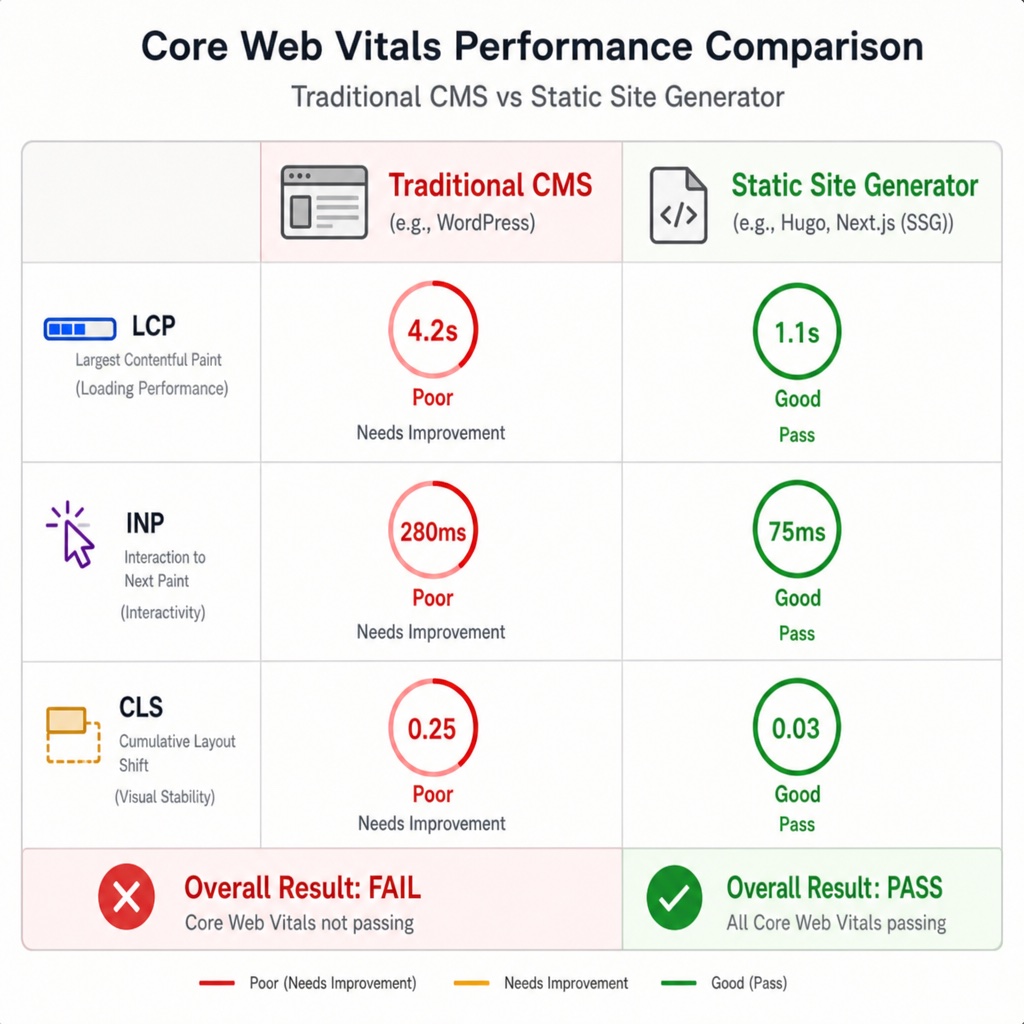
Google has been telling us for years that site speed matters for search rankings. In 2020 they made it official with something called Core Web Vitals: a set of measurements that grade how quickly your site loads and how smooth it feels to use.
WordPress sites frequently fail these tests. You can pass them, but it usually takes expensive hosting, a caching plugin, an image optimization plugin, a critical-CSS plugin, and a developer to keep it all working. Even then, results vary.
Modern static sites pass Core Web Vitals without any of that effort. The site is fast because of how it’s built, not because you paid extra to make it fast.
That has two real effects on your business:
- You rank better. Google’s algorithm rewards fast sites, and static sites are effectively as fast as it gets.
- Visitors stick around. Every extra second of load time increases the number of people who close the tab before they see what you do. If you’re spending money on paid ads, you’re literally paying to send traffic to a slow site.
We wrote more about this in our ultimate CMS comparison guide and in our post on the true cost of cheap website hosting plans, if you want to go deeper.
“But my team needs to update the site”
This is the most common concern we hear from business owners, and it’s a fair one. If your marketing coordinator posts a blog article every week, or your operations manager updates hours and events, they need an easy way to do that. WordPress has spoiled everyone with an easy-to-use editor.
The good news: modern static sites still give your team a modern content editor. The category of tool is called a “headless content manager.” Think of it as a clean, focused publishing tool that lives separately from your public website. Your team writes and edits in the tool the way they always have, and the site updates automatically in the background.
Concretely, that means:
- Your writers get a modern editor that looks a lot like Google Docs or Notion, not a 2003 WordPress dashboard
- You can hand out logins and permissions to different team members
- You can publish, schedule, or update posts without touching code
- The public website updates automatically whenever content changes
Your team’s day-to-day doesn’t get harder. In most cases it gets easier.
Where AI fits in (and why the old “static is only for developers” argument is gone)
For a long time, the honest downside of modern static sites was that they required a real developer to build. WordPress had 60,000 themes you could install and modify with a few clicks. Static sites required someone who could code.
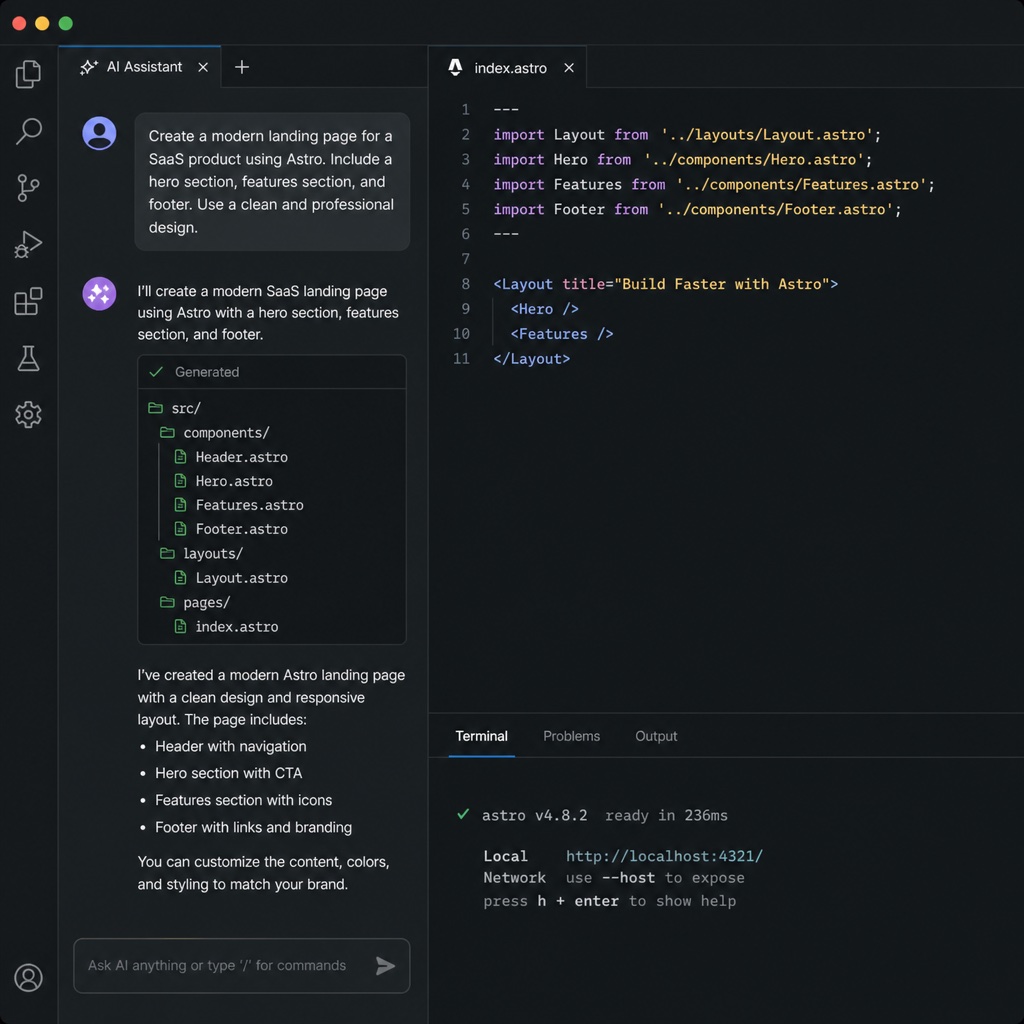
That gap has closed almost entirely in the last two years. Modern AI coding tools now generate clean, production-ready website code from a plain-English description. That means a good agency can build a fully custom site for a small business in weeks, not months, for a fraction of what a custom WordPress build used to cost.
This is how we do it at Revision Road. Our web development approach pairs the modern static-site framework called Astro with AI coding tools like Claude Code and Cursor. You get a completely custom site, built around your brand and message, at a price that used to only cover a WordPress theme with a few tweaks.
What it actually costs
WordPress feels cheap on paper. Basic hosting is a few dollars a month. But once you add up managed hosting (because basic hosting is too slow), premium theme licenses, plugin licenses, a security service, backup service, and ongoing developer time to keep it all running, most small businesses we audit are spending $150 to $400 a month just to keep an average WordPress site upright.
A modern static site typically runs on hosting that costs $0 to $20 per month, with no plugin licenses, no security service, and dramatically less ongoing maintenance. The hosting is genuinely free for most small businesses because the platforms serving these sites (Netlify, Vercel, Cloudflare Pages) can absorb enormous traffic without breaking a sweat.
The upfront build cost is real, of course. But your ongoing cost drops, your speed goes up, and your risk of a hack or an outage goes down. Over a two-year window, most of our clients spend less than they were before.
What “publishing” and “deploying” look like now
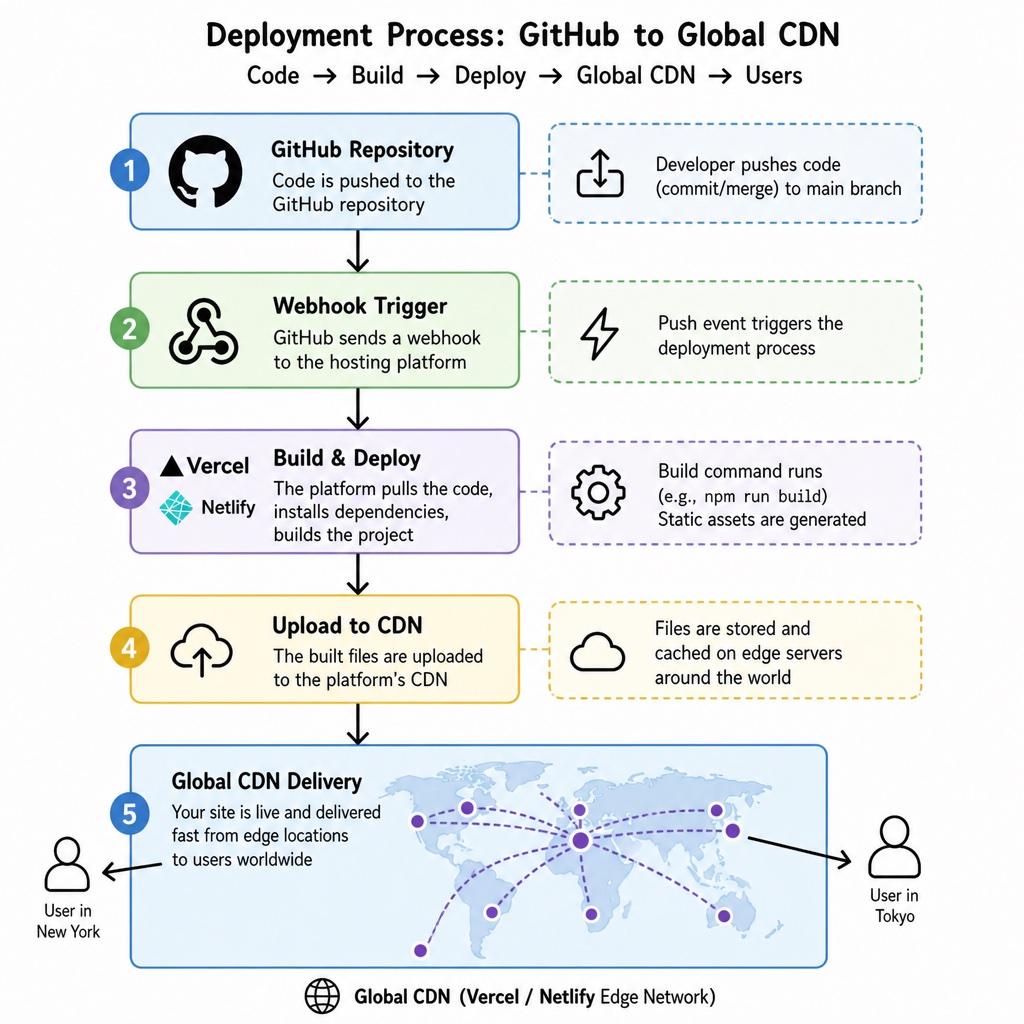
This part sounds technical but it’s important because it changes what a “site update” feels like for your team.
Modern static sites live in something called a code repository (usually on GitHub). Whenever a change happens, whether that’s a blog post from your marketing team or a design change from your developer, the site automatically rebuilds itself and pushes the update to servers all around the world within a minute or two.
The practical effect: no more “the site is down for maintenance.” No more “we’ll push the update at midnight to avoid downtime.” No more “did anyone back up the site before the update?” You get instant, safe, reversible changes, all the time.
Should your business move off WordPress?
Honestly, it depends. Here’s how we think about it with our clients:
Stay on WordPress (for now) if:
- Your site works fine, loads quickly, and doesn’t cost much to maintain
- Your team has a WordPress workflow that’s genuinely working
- You have no near-term plans for a redesign
Consider moving if:
- Your site is noticeably slow and you’ve already spent money trying to speed it up
- You’ve been hacked, had major plugin conflicts, or lost data in the last year
- Your hosting or maintenance bill has crept above $100 per month
- Your team dreads publishing because the editor is slow or clunky
- You’re already planning a redesign in the next 6 to 12 months
If a redesign is already on the calendar, this is the single best time to move. You’re going to invest in a new site anyway. Doing that on a modern stack instead of a new WordPress theme is one of the highest-leverage decisions a small business can make right now.
What a migration actually looks like
We won’t sugarcoat this: switching platforms is a real project. But it’s genuinely manageable with a good partner. The rough shape of it:
- Export your content. Blog posts, pages, and images come out of WordPress in a clean format that any modern platform can import.
- Rebuild the front-end. With AI coding tools, this is dramatically faster than it used to be. Most small business sites can be rebuilt in a few weeks.
- Set up the content editor. Your team gets trained on the new publishing tool, which is usually easier than the WordPress dashboard.
- Redirect old URLs. This is the SEO-critical step. Every existing URL on your old site needs to point to the equivalent page on the new site so you keep the search rankings you’ve earned.
- Launch and monitor. Once the new site is live, we watch Google Search Console for a few weeks to catch anything that needs a redirect adjustment.
The whole process for a typical small business site is a few weeks, not the multi-month agency project it used to be.
The bottom line
WordPress is not going to disappear tomorrow. Millions of sites will keep running on it, and for some situations it’s still the right tool. But for a small business that wants a fast, secure, low-maintenance website that ranks well and reflects a modern brand, WordPress is no longer the default answer. It’s just one option, and increasingly not the best one.
The modern web is faster, safer, and less expensive to run. The tools that used to require a large agency to use are now accessible to any business willing to work with a small, focused team that knows the stack.
If you’re thinking about a redesign or you’re tired of fighting your current site, get in touch. We’ll take an honest look at where you are and tell you whether moving makes sense for your business.
FAQs
No. WordPress still powers a huge chunk of the web and will keep running for years. What's happening is that the default answer to 'what should we build our site on?' has changed. For small businesses that care about speed, security, and low maintenance, modern static-site platforms are now the smarter starting point. Existing WordPress sites don't have to move overnight, but new builds increasingly aren't landing on WordPress at all.
Look for a few tell-tale signs. Your site loads slower than it did a year ago. Plugin updates have taken it down or broken layouts. You've had a security scare or a hack. Your monthly hosting, security, and maintenance costs have crept above $100. Your team dreads publishing because the dashboard is slow. Any two of these together is a strong signal it's time to plan a move, especially if a redesign is already on your near-term roadmap.
Not if the migration is done properly. The key is mapping every existing URL on your old site to the equivalent page on the new site with a 301 redirect so Google carries your rankings over. This is standard practice for any modern migration. In our experience, sites usually gain rankings after the move because the new site is faster and cleaner, which Google rewards.
Yes. Modern static sites pair with a 'headless' content editor that looks and feels a lot like Google Docs or Notion. Your team logs in, writes or edits, hits publish, and the live site updates automatically in the background. In most cases the editing experience is easier than the WordPress dashboard, not harder.
For a typical small business site with a few dozen pages and a blog, the whole process runs about four to eight weeks. That includes exporting your existing content, rebuilding the design on a modern framework, setting up your team's new editor, and mapping every old URL to a redirect so your SEO stays intact. Larger or more custom sites take longer, but this is a fraction of what a full custom WordPress build used to take.
Upfront build costs vary with the scope, but modern AI-assisted development has dropped the cost of a custom site meaningfully compared to a traditional agency WordPress build. Ongoing costs are where the real savings show up: hosting is usually $0 to $20 per month, and there are no plugin licenses or security services to pay for. Most of our clients spend less over a two-year window than they did on their old WordPress stack.
Ecommerce is the one area where a WordPress + WooCommerce setup can still make sense, especially for stores with hundreds of products and complex inventory. That said, modern static sites integrate cleanly with dedicated commerce platforms like Shopify, Snipcart, or Stripe-powered checkouts. If your store is small to mid-size, moving to a static front-end with a specialized commerce back-end is often faster, more secure, and easier to maintain than a WordPress + WooCommerce install.